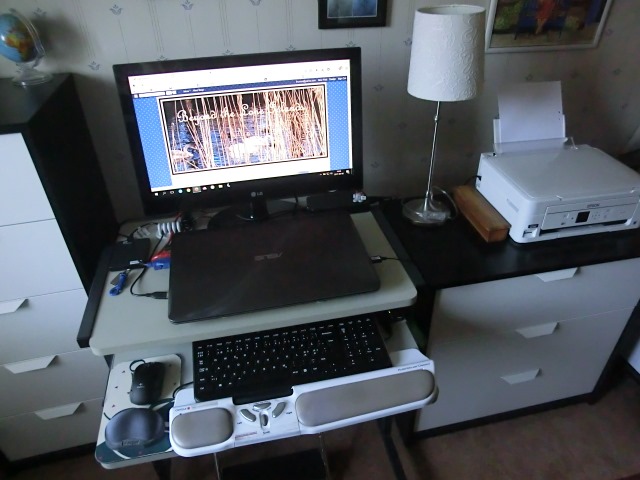
… the new queen of my study, that is … 
My old laptop, Bella, officially retired from public duties last weekend, and let her successor take the throne from May 1st. The new one’s name is Susie (she’s an ASUS). May she live a long and happy life!
In the photo, Susie is the dark rectangle in the middle (lid closed). The rest of what you see is her throne, royal court and humble servants. (Extra monitor, wireless keybord, various mice devices, scanner/printer and whatnots…)
Ex-queen Bella will be on (offline) standby for a while, in case further consultations should be needed. But we have decided that the time has come for her to “step back from royal duties that can involve extensive travel” (on the internet)…
(Quote from an article about Prince Philip)
I kept a sort of diary of my progress (and failures) in setting up the new computer. Basically I tried to find and install software that I’ve become used to using on the old one. A new term I learned in this process was abandonware…
… a product, typically software, ignored by its owner and manufacturer, and for which no support is available. [Wikipedia]
One such old servant that I really wanted to hold on to was Picasa (the main photo editor I’ve been using throughout my blogging life). It’s been abandoned by Google; but can still be found “out there” in cyberspace.
Another is MS Works (abandoned by Microsoft) which I’ve been using ever since the very first computer I had at work, way back in the early 1990s… Not much for word processing in later years (I’ve been using Open Office). But the Works database... For one thing, ever since the early 2000s I have been using it for a database list of all the books I read. (The advantage of a database being that you can search and sort it in lots of different ways.) And alas, there seems to be no free software to convert this to other database systems.
When I bought the previous computer (Bella), Works still came ‘free’ with the basic Windows software. I have also been able to still use it on Bella after the upgrade to Win 10. So I hadn’t expected this to be a problem on the new one either. But as it turned out, it wasn’t included on Susie… And my first attempts to install it from the web failed, and I just kept finding links that said that no, Microsoft has now abandoned Works, and Windows 10 does not accept it. So I was beginning to think I’d just have to print out a list on paper from Bella, and be content with that.
But then, suddenly, I discovered that somehow, one of my attempted downloads had actually installed itself – just not among other downloads, but as a fake extra DVD-unit. The laptop has a real DVD unit too; but in the file explorer, there were now two such units; with one of them containing the Works software. It still goes beyond my understanding exactly how this works. But it does; and neither Windows nor my antivirus program seems bothered by it. So I can only assume that “someone out there” has been very clever in finding a way around the installation problems… (Not sure from which site it was that I finally managed to install it. But heartfelt thanks to unknown benefactor!)
The reason I’m mentioning this is not so much that I think these are “must have” software for everyone; but more as an encouragement that if you fail on your first attempt to download something, it can be worth while trying again from another site.
Anyway. I think I have managed to track down the basic software that I’m used to. As for transferring old documents and photos etc from the old computer, I decided to copy them onto an extra hard drive first, and have only transferred the most recent and frequently used stuff to Susie yet. The plan is to take my time with the rest and sort things through and reorganize a bit. (Remains to be seen how that works out…)
Question to other photographers: How do you sort and store your pictures?? Can you find things when you need them?