Showing posts with label computers. Show all posts

Sunday, 18 May 2025

Updates


Lately, my Android tablet that I bought six years ago, back in 2019, has kept reminding me that it's no longer able to update some of the apps that I have on it. Checking up on Android versions, I found that the tablet is stuck on Android 7, while the latest ones now seem to have Android 15. So perhaps really more suprising that there are still quite a few apps on it that I am still able to use...

No real panic, as my laptop and my phone are both younger, and have been able to keep up with the necessary app updates so far. Nevertheless, I decided it was probably time to look into getting a new tablet as well. 

I did some online research; but somehow, I still have this old-fashioned wish (when possible) to see what I'm buying - and perhaps be able to ask some human "tech guy" a question or two as well. So this past Thursday, I took a bus to an electronics shop "across town". I had seen online that they had tablets of the same brand as my old one (Lenovo), which on the whole I've been getting along with very well (until its recent hints of not quite being able to keep up with everything any more). 

Ironically, it turned out that of the tablets on display in the shop, the one that I fell for (Lenovo Tab M11) was not in stock there - but they could order it for me, and have it delivered to a pick-up place close to where I live the very next day. So I went with that option.

The parcel arrived as promised; and after reading some basic instructions it seemed like it would be easy to set up, as I could simply copy all data from the old one to the new one using an USB cable. So I got that job started already on Friday afternoon. So far, so good... 

But then, somewhere along my fiddling about with adjusting various settings etc, the screen keyboard disappeared, and no matter what I did, I found no way to get it back. Super frustrating. The first thing I did was of course to google the problem. And I did find plenty of people in various forums asking the same question (about disappearing screen keyboards). But alas no applicable answers!

So finally I decided to reset the tablet to its original settings (removing all my transferred data) and start over. That did restore the screen keyboard (phew). But since I still don't know how I came to lose it in the first place, I'm now afraid of it happening again. So now I'm taking things really slow. So not repeating the copying of data from the old tablet, but instead installing one app at a time, and trying to keep better track of what I'm doing. It's time consuming, but after all (I keep reminding myself) there's no real hurry. All my important apps are still working somewhere, even if not all on the same device... 

It has taken a lot of time that might otherwise have been spent on blogging, though.


One answer found when I googled the definiton of "android": 

"The Latin root androides literally means “resembling a man,” and androids really know how to blend in. Androids mostly appear in science fiction novels and films, but who knows, maybe you're friends with an android and you don't even know it. Yet."


Saturday, 4 January 2025

Digital Dissociative Identity Disorder?

Quotes from a medical website: 

Dissociative identity disorder (DID) is a mental health condition where you have two or more separate personalities that control your behavior at different times. When personalities switch, you’ll have gaps in your memory. ---

--- “Dissociate” means to separate or disconnect. People with dissociative identity disorder may experience several different personalities --- These personalities may control your behavior at different times. --- Memories may not transfer from one identity to another, which can cause amnesia (gaps in memory). --- DID interferes with your ability to function in your day to day. It can impact your relationships with others and performance at school or work. 

This past week, I have diagnosed myself as suffering from DDID - as in Digital Dissociative Identity Disorder...

I blame Google, and seriously doubt any form of psychotherapy will help. 


The background can be found in my December post Commenting Issues. To summarize, these issues started when Google, for unknown reason, decided to suddenly stop Firefox (my preferred browser for this blog) from working with "embedded" blog comments. For me that meant suddenly finding myself unable to reply to other peoples' comments on this blog from my computer. My first attempt to solve this was to change to using a pop-up window for comments instead of the embedded. That worked fine for me "within that window", but turned out to have some other disadvantages instead. (Those of you who noticed will know. For those of you who did not, staying ignorant will probably be better for you than to have the details explained.) 

I also had the Microsoft Edge browser on the computer, but there I am logged into my other blog (Greetings from the Past) under a different "identity". And it seems one can't be logged in to two different Blogger accounts at the same time, on the same browser.

So I installed Google Chrome as a third browser. For some reason, there  Google seems to have no problems to still allow embedded commenting. 

But in my process of experimenting with different solutions, I kept running into other problems instead. And somewhere in midst of it all, my own brain went on strike, and it came to a point where I suddenly just felt totally confused by the whole mess of different browsers and websites, and what emails and logins and passwords to use where...

Google also somewhere along the line turned totally fanatic about adding extra layers of security, and was no longer content with my usual passwords, but started to require extra codes sent back and forth between my various appliances (laptop, phone and tablet) to prove that I was really me (which I was now almost beginning to doubt myself). On top of all, they also, on one account, forced me to switch from an old (non-google) email address as login, to a brand new gmail addess as primary login instead (a different one from my other already existing gmail).

This was the final straw that made me diagnose myself as now seriously suffering from DDID. The symptoms seem to fit perfectly with the medical ones: Memory gaps + disability to function in my day to day "work" and "relationships with others"... 

It also makes me feel far from secure, and instead rather terrified of no longer knowing what login I'm supposed to use where. (Even when writing things down I'm not sure I got them right.) At the moment I do seem to be logged in "somewhere" on both blogs - but I really fear the next time I accidentally find myself logged out, and have to try and get back in again...


Friday, 20 December 2024

Commenting Issues

The other day I suddenly ran into a tech issue that has never happened before during my nearly 16 years of blogging: I was not able to comment on my own blog (like replying to other people's comments).

Super frustrating, and I couldn't even figure out what they meant by it... I've been using  Firefox (browser) with this blog for years, and this message has never come up before. I also have Microsoft Edge on the laptop, but the thing is, I have my family history blog (Greetings from the Past) on a separate Blogger account; and to avoid the trouble of logging in and out every time, I find it most practical to use different browsers for the two. Which worked fine - until now... So I've had a couple of days scratching my head over this. Just following the message's "Learn more..." instructions did not help. I then downloaded a third browser (Chrome) - but that in turn brought some other irritations. However, I found that I was still able to reply to comments as usual on the Firefox app on my tablet - so I have not been totally locked out from two-way communication.

But then today it hit me to check the Blogger settings... And found their comment settings (which I don't think I've ever changed since I first set up the blog):

As the word "embedded" was involved in the Google/Firefox error message, I changed my Blogger settings from Embedded to Popup - and that seems to have solved the problem.

I'm writing this down chiefly as a reminder for myself, but I thought I might as well publish it on the blog as well - in case anyone else has come across similar issues, or perhaps just happens to notice my shift to popup for comments here. (Hopefully the popup will work for others as well as for myself.)

Tuesday, 11 April 2023

The Big Shift


Scilla in the rain

Today it's been raining - which suited me fine, really, as that made it a good day to mostly stay in and devote my attention to The Big Shift... As in disconnecting my old laptop from all its "paraphernalia", and trying to get the new laptop set up the same way.

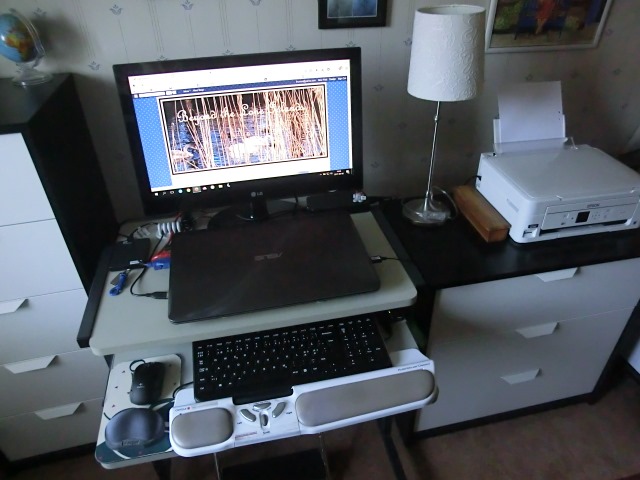
On the whole it went okay, even if I'm still struggling with optimizing various settings. But at least I've managed to get the computer to recognise its new "workmates": wireless keyboard and mouse, "rollermouse" (= the wrist-support thingy with built-in mouse functions), larger screen, and printer/scanner. I may still have to get used to some things/programs not behaving exactly as they did with the old laptop/Windows 10, though. 

One thing that had me confused today was that I kept getting the wrong "signs" from my keyboard; and Ctrl+ for example made things smaller instead of bigger on the screen, and I also couldn't find the key to reverse that... Enough to drive anyone crazy, right?! But eventually it dawned on me that it might have been caused by switching my prioritised language to English instead of Swedish... I switched back, and to my relief my keyboard changed back to "normal" (Swedish) functions as well. (Phew!)

So... Still a lot of "little things" like that to get my head round... But I'm making progress! :)

I still haven't transferred more than a few test files of various categories to the new machine, though. I'm thinking of leaving quite a lot of my old archives on external drives this time, as I'd like to try to get things organised a bit differently on the new one. I guess I'll keep taking things one step at a time for a while... 

Anyway, it seems I've just produced my first blog post with the new laptop used as "desktop".

Tuesday, 4 April 2023

Dinosaur Easter Eggs (?)


Yesterday I went to the supermarket for a couple of minor things I'd forgotten to order with my home delivery last week. Inside, I was met by these giant-sized Easter eggs... I'm afraid the photo doesn't quite do them justice as it might just as well be a trick photo to do with camera perspective... But these eggs really were enormous, I doubt I'd have been able to embrace one of them round the middle! So in my mind I started imagining  "Jurassic Park" kind of scenes, as to the size of the creatures supposed to have laid them... ;-)

Today I went "across town" again, hunting for a different kind of Easter Surprise for myself. Not egg-shaped (and probably would not fit in one of those giant eggs above either), but who knows what awaits inside... (Well. Windows 11, for one thing!)

Yes, it's my new laptop. Charging its battery while I'm still using my old one to write this; but  I'm thinking it's probably best if I wait at least until Thursday to actually "open" the thing to get the start-up process going. Tomorrow I have other things to do (like laundry), so won't be able to concentrate.

After a good deal of 'headache' and online research, I came to the conclusion over the weekend that I probably won't be able to find exactly what I wanted (i.e. really just a "healthy" version of my old one - lol)... For example, my old laptop has a built-in CD/DVD reader/burner, and a built-in SD card-reader, which I've found useful. (Especially the card-reader, since that's how I transfer photos from my separate camera to the computer.) But all the newer models (at reasonable price) seem to aim to chiefly to be slim and light and skipping too many "extras". So the last few days I've been googling alternative solutions, involving external accessories, ports, cords and adapters instead... Phew! 

After a final pep-talk with my brother on the phone yesterday, today I gathered my collected documentation and took the bus to a shopping center across town, where two of our big "tech" kind of stores are situated. At one of them I recently bought my new phone. Today I went to the other one, because that's where they were supposed to have the laptop in stock that I'd decided on - an ASUS, same brand as my old one. And to my relief they did have it. Well, I should perhaps hold back on the "relief" until I see how I actually get along with it! But at least I was able to give a reasonable impression of knowing what I wanted when talking to the sales guy, and the purchase as such did not take up a lot of time. ;-)

Opening the box at home, the only instruction I found included was to charge the battery for at least three hours before starting the thing. I then went in search of an online manual, but can't find one for this exact model. On my new phone I was met by a set-up guide once I turned that on though. Perhaps something similar will happen when I press the magic button on this one? 

Meanwhile, my old laptop is still working, so hopefully I'll have time to figure things out!


Tuesday, 28 March 2023

Making Progress...

Getting acquainted with my new phone is still taking up a lot of my time - and I keep oscillating between frustration and revelations... ;-)

Out on a short chilly walk on Sunday (just my usual turn around the cemetery for exercise) I had my first attempt at shooting some outdoor photos. Or so I thought. Turned out when I got home that what I had actually done was shoot some very short, shaky and blurry videos (of things not supposed to move!). 

Being used to actually pressing a physical button to take photos (even on my old phone), I guess I probably pressed the "screen button" on the new phone too hard...

Yesterday was sunny (even if still rather chilly), and a better day for outdoor photography. I managed a few shots in and near the park downtown; and then at home also experimented with creating collages. Some crocuses had shown their face again after the snow-shock that must have buried them the other day; and I spotted a couple of more unusual ducks among the usual mallards in the river.

I think they must be goosanders (Lat. Mergus merganser, Swedish: storskrake)

The white ones, bottom right, are snowdrops with snow dropped on top of them... (The crocuses were in a sunny spot, the snowdrops in a shady spot.)

- - -

Some of my other experiments have been related to sound rather than images. The new phone turned out to have no headphone jack; so the day after I bought the phone, I decided to also invest in a couple of new wireless (Bluetooth) earbuds. They don't even have a cord between them to keep the pair together... So far I haven't dared use them outside the flat! ;) They're surprisingly comfortable, though.

The photo on the left is a shot from my TV screen today (watching an episode of Foyle's War). Just as a reminder how far technology has come in the past 80 years or so...!

You turn them on/off and change volume etc by tapping on the earbuds themselves. I've still not quite mastered that art... Sometimes if I want to increase or decrease the volume, I manage to turn them off instead. Or suddenly an automatic voice cries "GAMING MODE" in my ear...  It seems I'm also supposed to be able to answer a phone call by a tap, if I happen to be wearing them when the phone rings. (That still remains to be tested.)

Getting the earbuds also inspired me to look into how to transfer music to the phone from my laptop (where I have pretty much all my old vinyls and CDs saved as mp3-files). Grasping how to do that turned out another headache. I'll just sum it up by saying I tried things more than one way without success... Finally, yesterday, I somehow managed to transfer two (2) albums, though - still hadn't got a clue why only those two (out of several more attempts) were successful!

Somewhere in between, it also occurred to me to explore Spotify (music streaming app). Wow... Somehow I've been under the impression that the free version of this app would also involve lots of unwanted ads and interruptions. (Perhaps in the beginning it did?) But I find now that it does not! And so easy to find old favourites... And once I started marking those, the app started making automatic playlists for me, and bringing up even more suggestions that I hadn't thought of... But you can also listen to full albums. (I bet some of you are laughing at me now. You probably knew all this since like forever.) Anyway, I got spellbound for hours yesterday afternoon, just exploring this whole world of old/new  music... Conclusion at the end of the day: No need to have tons of music files downloaded now - only perhaps a few, if I also want to be able to listen offline sometimes.

Still... Always unsatisfied with unsolved mysteries, today I returned to the problem of how to transfer music from the computer - and think I managed to figure it out. Somehow, after the two successful downloads yesterday, I must have broken off the procedure and failed to start over correctly. Like it seems essential that I turn on the phone first, before connecting it (by cord) to the computer... Never mind the rest of the steps, as it probably varies between devices anyway (which apps are involved etc). Suffice it to say that I have now also downloaded a limited number of my own albums for "offline" listening. 

However, in the process, I've probably also developed an addiction to continue exploring Spotify...


Sunday, 26 March 2023

A Snowy Start to Spring...

... and more updates on the Phone/Computer Situation


Today it was time here in Sweden to change our clocks to 'daylight saving time' - or as we usually call it: "summer time" (sommartid). I still have several that need to be reset manually, and I did that before I went to bed last night. (Probably forgot at least one, because I nearly always do. But if I did, I haven't yet discovered it!) 

When I looked out of my window this morning, the view was far from summer-like, though. It's snowing again! (Still going on when I write this, hours later...)

It's been a strange week, very much dominated by the Phone and Computer Situation.

The Good News is that my SIM card arrived by post on Friday afternoon. Inserted it into the new phone, and abracadabra, my old phone number was back in use - including the account balance attached to it. Not, however, my contacts - so I had to enter those manually. Which made me realise that these days I probably don't actually have a valid phone number for a whole lot of old friends any more - as, like myself, many have chosen these days not to have their number listed as searchable online any more, and FB/Messenger has taken over as the primary way of staying in touch... 

Having my phone number back on my phone also allowed me to re-establish the all-important 'Bank ID' (as mentioned in previous post - almost as essential here these days as having a physical ID card). Phew!

On Friday, "with fingers and toes crossed", I also started the process of moving vs. copying all photos stored on my laptop to an external hard drive. I did have copies of most old stuff before, but still wanted to make sure I got a fresh back-up of everything, as I also needed to permanently delete some stuff from the laptop now. This procedure literally took all day, and I kept checking on the progress frequently, to make sure the laptop did not seem to be getting overheated. It did not, though, and it managed to complete the task without any major problems arising. (Phew!) We're talking of ALL my digital camera photos (going back to my first digital camera from 2006) and also all edited versions + all scanned and 'photo-copied'  and downloaded images (including lots and lots of both new and old postcards + copied old photos from family albums). 

On Saturday, I continued to also transfer/copy Documents, plus all my collected Music and Audio books (other than the Audible ones, which are thankfully safely stored online).

So now, knowing I have a fresh back-up of everything 'personal', I feel I can relax a little about the computer situation. Besides Windows' protests about lack of storage space for important updates earlier in the week, I do also have another "issue" with the laptop though - which means I'd still better start looking into finding a replacement a.s.a.p.

 Yes. It's sort of "coming apart at the seams" (reminding of my old phone after the battery overheated). I did notice some time ago that the 'mouse' part had risen a little - but it still worked then, and I always use the laptop with a separate keyboard + 'roller mouse' anyway...


However, it has got worse; and the 'click' function on the laptop no longer works at all now. So looking into getting a new laptop popped right up to the top of things to do next...There are a lot of things to consider, though, so I don't want to be too hasty about it. (And no need to be, now that I know I have personal files safely backed up.)

Meanwhile, I'm not letting the computer work "unsupervised"; and have also taken the extra precaution of not only turning off the laptop itself when I've finished, but have also added an extra "switch" to the wall socket...


Whereas a mobile phone is usually "on" 24/7, the battery in the laptop really shouldn't have a chance to get overheated all by itself.


Friday, 1 May 2020

D.I.Y. (or not)

A few weeks back, my printer suddenly went on strike, showing this error message:


It did still work as scanner, but refused to print. I double-checked the error code online, and it does seem to be something one cannot fix from home. Of course, if Epson had happened to live next door, I could have contacted him... ;) However, I quickly realized that In Real Life, even if should manage to find a repair place, it would be not only simpler but also cheaper to just buy a new machine. (From environmental point of view, that's crazy - but it's how it is.)

But... How and where to buy a new printer just now, in corona times?? (Living alone, no car, and at the moment practicing self-isolation as far as possible...)

While ordering groceries with home delivery from my usual supermarket, it struck me that they do also have some technical stuff there, even if not very much to choose from. I checked, and found that they did have one kind of printer/scanner - which also happened to be on sale just now. I took a chance and added one to my order, hoping for the best (mentally prepared that with the sale, there might not be any left). But: I was lucky, and the printer was delivered problem-free with my groceries yesterday (at bargain price and no extra delivery fee).


It's a HP DeskJet 2630. Including setup ink cartridges it was less than half the price of a normal set of ink for my old Epson...

Today, I spent like half the day getting it installed. As so often, the instructions were not quite as easy peasy as promised... But, with a bit of trial and error, I seem to have it working with the laptop by cable now. (It's supposed to also work wireless but I've not tried that yet. Not sure I need that anyway.)

Monday, 11 November 2019

Permanent Record

One of the books I read/listened to last month was...


Permanent Record by Edward Snowden (2019)
Audio book narrated by Holter Graham
11 h 30 min 


Edward Snowden (link to Wiki) was born in 1983, and at age 30 became famous as "whistleblower"; revealing how the US government was building a system of world-wide mass surveillance. In 2013 he passed on to the press information he had collected while working with computer systems for the CIA and NSA (National Security Agency). Snowden in turn was then accused of espionage and of stealing government data/documents. He was offered asylum in Russia; where he still lives in exile. 

This book is his own account of the events - starting back in his childhood to explain his background, his early interest in computers, and how he came to have the jobs he did. It also explains how he came to have serious doubts about the ethics of what he found out through his work (about the US being able to collect data about the private lives of "every person on earth"); and how he finally decided to expose to the world what he knew.

While my understanding of the technical details is still limited, I found his story interesting and worth listening to - and the subject of personal integrity vs computer technology certainly also worth contemplating. (Like: As I downloaded this book online, the CIA probably already knows I read it...)


Tuesday, 9 April 2019

The Seagulls Have Landed

One of the sure signs of spring around here: The seagulls have arrived! A gang of them always come up the river from the coast in spring, to spend the summer here.

More signs of spring:

 Flowers are being planted in the parks and graveyards.

 Trees and bushes are slowly turning green.

 I bought some daffodils for my balcony. (In Swedish we call them "pÃ¥skliljor" = Easter Lilies)


My strawberry plants have survived another winter. (In the late autumn, I wrap the box in newspapers, put it under a bench on the balcony, cover the bench with a tarpaulin - and hope for the best...)


There is still some life left in the clematis, too - at least in one of my two plants. One may have died, but the branches are all so entangled with each other on the trellis that it is very hard to tell which belong to which pot... I shall have to wait for flowers before I decide what to do! (I seem to remember that those are slightly different in colour between the two plants.)

We had a lovely sunny weekend with some warmer winds at last (although back to colder again now!) - but where did my feet (and the bus) take me? Not out into the countryside; but to the big shopping district across town...


 Photos taken from a glass-covered footbridge across the main road, connecting two main parts of the shopping district.


 All for a good cause though (well, in my opinion anyway)...


A new tablet, to serve as companion to the laptop (which serves as "desktop" in my study) and the mobile phone, whose memory is beginning to struggle to keep up with all the app updates. 

I gave it some thought, and arrived at the conclusion that a good tablet might allow me to free up some memory on the phone, and make it possible to keep that for bit longer instead.

I would probably have bought a new tablet even earlier, if not for the fact that it's such a struggle to decide which one to buy... 

I've had another kind of tablet before, but it was never a very good buy to start with; and by now it's very outdated, so more trouble than help, really. (Because it's not very good, I don't use it much, which in turn means that when I do want to use it, for one thing I have to charge it, and then it also wants to do a million updates before it allows me to do anything else... By which time I've usually lost patience with it and turned to either the phone or the laptop instead...)

So I've been spending quite a bit of time searching and comparing etc online to find the "right" kind of tablet. But there are so many things to think of, and always so much additional tech information that is just 'mumbo jumbo' to me as I don't know what it means...

But with the arrival of Spring to inspire me, I decided on Saturday to go out to one of the big media stores - the same one where I bought my laptop, and also my camera. And again I felt I got good help there, to check my "thoughts" about what I wanted, with a sales person who seemed to know what he (as well as I) was talking about. It resulted in the purchase of a Lenovo TAB4 10 Plus. 

So far, I think we (Len & I) may be able to get along well... Even if it always takes a bit of time to get properly acquainted! 

One area where I do think the tablet will be helpful is when it comes to reading and commenting on blogs. (I often read blogs on my phone, but find it difficult to comment from there.)

Writing blog posts will probably still usually be a job for the laptop, though, as that is where I collect my photos!

Thursday, 17 January 2019

Mission Accomplished


My brother came visiting for a couple of days this week, bringing his complete set of screwdrivers. So that solved my problem (described a few posts ago) of how to best “kill” those two old laptops that I wanted to get rid of for good…


While brother did the manhandling, I had some photo-fun...

Monday, 7 January 2019

Killing Time

190106 kill a computer-001

Mind you – it was not really Time that needed to be killed, but a couple of old laptops that have been lurking in my wardrobe for years now, guarding all my secrets from the past… My personal data like documents, pictures and music were safely copied to more convenient storage long ago. The reason why the dragons are still lurking is just my distrust of being able to properly wipe their memories, before handing them over to the recycling center… But one of my New Year Resolutions for 2019 (not written down anywhere but in my own head) is/was to finally Do Something About It.

So on Friday, I started with the newer of the two (Windows7-not-very-successfully-updated-to-Windows10) . (Replaced by my present pc two years ago). After a couple of rounds of trial and error, I did find my way within the Windows software to restore that one to its original factory settings; including cleaning it from personal data. It took five or six hours to complete the process; but at the end of the day, it did seem to have been successful. (Yes I know - there are probably also computer wizards out there who could still bring it all back… But I doubt it’s likely that anyone would find it worth while.)

The other, even older dragon (Windows Vista) proved to be a tougher challenge, though. My first battle with it on Saturday got me nowhere. I had the manual, I read instructions, I followed instructions…  Sometimes, to tease me, it gave a convincing impression of making an effort, showing messages like “Windows is loading files” or “This may take a while” … just to eventually end up with some error message, and another prompt to restart. Which, each time, it happily did. Yesterday, I gave up, and instead spent hours on manually deleting personal files, uninstallling software that I knew were not in the original setup, and deleting internet history and passwords etc. Today, I again tried alternative ways of resetting/restoring, both with and without CDs. Nope. The dragon is still alive, and at every restart optimistically suggests that I should consider doing a new backup, and update my virus protection… (I’ve kept it offline during my experiments.)

Perhaps I should just connect it to the internet, and hope for some vicious virus to find it? Or drown it in the shower in the bathroom? (I found a YouTube clip showing that…) (I suppose I could also ask my brother the IT-wizard. I’m just a bit stubborn sometimes…)

Out of curiostiy: What do you do with old computers?? Have you got a pc museum in your basement/attic, or have you actually got rid of them (and how)?


Saturday, 6 May 2017

Introducing the new Queen

CIMG0790

…  the new queen of my study, that is … Winking smile

My old laptop, Bella, officially retired from public duties last weekend, and let her successor take the throne from May 1st. The new one’s name is Susie (she’s an ASUS). May she live a long and happy life!

In the photo, Susie is the dark rectangle in the middle (lid closed). The rest of what you see is her throne, royal court and humble servants. (Extra monitor, wireless keybord, various mice devices, scanner/printer and whatnots…)

Ex-queen Bella will be on (offline) standby for a while, in case further consultations should be needed. But we have decided that the time has come for her to “step back from royal duties that can involve extensive travel” (on the internet)…
(Quote from an article about Prince Philip) Winking smile

I kept a sort of diary of my progress (and failures) in setting up the new computer. Basically I tried to find and install software that I’ve become used to using on the old one. A new term I learned in this process was abandonware…

… a product, typically software, ignored by its owner and manufacturer, and for which no support is available. [Wikipedia]

One such old servant that I really wanted to hold on to was Picasa (the main photo editor I’ve been using throughout my blogging life). It’s been abandoned by Google; but can still be found “out there” in cyberspace.

Another is MS Works (abandoned by Microsoft) which I’ve been using ever since the very first computer I had at work, way back in the early 1990s… Not much for word processing in later years (I’ve been using Open Office). But the Works database... For one thing, ever since the early 2000s I have been using it for a database list of all the books I read. (The advantage of a database being that you can search and sort it in lots of different ways.) And alas, there seems to be no free software to convert this to other database systems.

When I bought the previous computer (Bella), Works still came ‘free’ with the basic Windows software. I have also been able to still use it on Bella after the upgrade to Win 10. So I hadn’t expected this to be a problem on the new one either. But as it turned out, it wasn’t included on Susie… And my first attempts to install it from the web failed, and I just kept finding links that said that no, Microsoft has now abandoned Works, and Windows 10 does not accept it. So I was beginning to think I’d just have to print out a list on paper from Bella, and be content with that.

But then, suddenly, I discovered that somehow, one of my attempted downloads had actually installed itself – just not among other downloads, but as a fake extra DVD-unit. The laptop has a real DVD unit too; but in the file explorer, there were now two such units; with one of them containing the Works software. It still goes beyond my understanding exactly how this works. But it does; and neither Windows nor my antivirus program seems bothered by it. So I can only assume that “someone out there” has been very clever in finding a way around the installation problems… (Not sure from which site it was that I finally managed to install it. But heartfelt thanks to unknown benefactor!)

The reason I’m mentioning this is not so much that I think these are “must have” software for everyone; but more as an encouragement that if you fail on your first attempt to download something, it can be worth while trying again from another site.

Anyway. I think I have managed to track down the basic software that I’m used to. As for transferring old documents and photos etc from the old computer, I decided to copy them onto an extra hard drive first, and have only transferred the most recent and frequently used stuff to Susie yet. The plan is to take my time with the rest and sort things through and reorganize a bit. (Remains to be seen how that works out…)

Question to other photographers: How do you sort and store your pictures?? Can you find things when you need them?

Saturday, 22 April 2017

It Is Here

CIMG0690

I went to pick up the new laptop yesterday, and managed to bring it home safely. So far, so good! It started smoothly - and oh, so quickly and silently compared to the old one! (But then the new one really doesn’t have all that much in it to wrestle with yet!)

The store did the initial set-up of Microsoft 10 + antivirus software for me. But I still had various registration processes to complete when I got it. (Actually not sure I’ve even managed all of those properly yet. I spent most of yesterday reading the Windows 10 manual - again…) And then to collect and install and log into other software that I’m used to having… It will no doubt take some time! After seven years with my old laptop, it’s a bit like “moving house”. Almost worse in some ways, considering the billons of accounts and apps and passwords involved! Oh dear…

Someone wanted to know what I bought. It’s an ASUS K756UW-T4071T. Should anyone happen to find any info or reviews about it anywhere else than at Swedish Media Markt where I bought it, please tell me. I haven’t succeeded so far! (I’m beginning to think I really bought the One and Only!)

It is the same size as my old computer, with a 17.3” screen. It has 8 GB RAM (2x4), Intel Core i5 processor, two hard drives 128+1000 GB, all the same ports as my old one (+ USB 3.0 and 3.1 which I didn’t have on the old one), DVD burner, bluetooth, memory card reader, webcam… If anything essential is missing, or not working as it should, I haven’t discovered that yet!

I might give the machine a more personal nickname later, but we’ll get to know each other a bit first…

I’m still using Bella, the old laptop, to write this post. I have got the new one to connect to the internet, though; and besides Google Chrome I’ve also managed to download Firefox and sync my bookmarks saved there. I normally use Firefox in Blogland, because of how my DawnTreader blog accounts were initially set up. (In Chrome, I appear under a different identity and it gets so very confusing. So I find it easier to switch browsers for different jobs, rather than to go through the hassle of logging in and out of Google on the same browser, depending on what I’m doing.)

All my personal files (photos and documents and whatever) are still either on the transition drive or on the old computer. I’m trying to get some things better organised in the process.

Luckily while all this is going on, I also have my smartphone to help me keep an eye on what I’m “missing”…

Now I’m going to relax just passively watching TV the rest of the evening, though!


Thursday, 20 April 2017

Update Update

After several more failed attempts, late last night Bella (my old laptop) finally managed to complete the new Windows 10 update. Good girl!

However… Realizing that these frequent update struggles are not likely to get any better, I actually also “took the plunge” yesterday afternoon and went across town to the huge Media Markt store to look at (and buy) a new one.

It was not really a random decision – I had done my research online first. As I wrote at the end of my previous post, I really felt I wanted one very similar to my old one (same size, same kinds of ports etc)  - just “perkier” (more memory, more storage)… This proved easier said than found. One that looked promising at first (in my online search) turned out to have a few things against it (which might also explain its low price). And others that filled the requirements were so expensive it really made me wonder if I was perhaps setting my goals way to high…

But then, in yet another online search, I suddenly came upon one which actually seemed to fit all my requirements, and at quite a good price too. Their ad informed me that the MM store in my town had it in stock, but didn’t specify how many - and the web shop had only five… So I decided it was worth going to MM to have a look – immediately.

I haven’t been to that store more than once or twice before. It’s really huge, and I felt quite lost when I came in there. But luckily, they also turned out very service-minded – and it seemed I had come at an hour when there were very few other customers in the store. I got almost immediate attention from one (young, male) shop assistant. I showed him the specification that I had printed out at home the same day, and he set off finding it for me. It turned out not so easy. The machine I wanted turned out not to be among the dozens on display. But their stock inventory did say there should be two left… The guy told me I could just stay where I was while he kept on searching. Round and round the shelves he went… scratching his head… But eventually he found it – just the one. He got the box opened for me so that I could have a look at its exterior. Unfortunately I could not see it with the screen turned on. But as it seemed to be the very last specimen of its kind, and according to the specifications just what I wanted, and at a good price… I decided to buy it. The shop assistant too, the more he looked into the details (and the price), seemed more and more impressed with it as well. He also seemed to wonder what I wanted all this capacity and storage for… 

I should add (because I found it rather amusing myself) that before the purchase was completed, I think probably all the staff in the store had been involved in some way or other. While the first guy was running around searching, others came up to me and asked if I needed help; and first guy in turn asked others for help with this and that.

The laptop is still at the store as I decided to accept the offer (for a certain amount extra, of course) to let them do the initial setup (Windows 10!) and backup copy for me + installation of antivirus software. They called this afternoon to tell me it’s ready. (And I assume that also means it turned out to work as it should!) So I intend to go and pick it up tomorrow.

The offer also included transferring files from my old computer (if I brought that in). But I decided against that, as I'm really not sure that I want “the whole mess" of old files copied straight over to the new one. Again this decision seemed to make the shop assistant curious… But when I explained that one of my hobbies is photography, and that I have more than seven years of photos collected on my old computer (not to mention lots of other stuff too!), he seemed to begin to “get it”…

So instead I also bought a new extra external hard drive, and will copy my old files myself to that. But I feel I want to start afresh with only the more recent stuff transferred to the new computer to start with, taking my time to re/organize things. A lot of old files can probably just be left on the extra drive to be collected later if I need them.

Copying everything will take time, but as the old computer is still working (and I can let it do this copying offline!) there’s no hurry. I got started today… The last five years of camera photos (2012-2017 = 35480 images… took around 3 hours to copy… It’s just the “tip of the iceberg”, though. (I have had digital cameras since 2006; and also have lots of copied and scanned images from before that. And music, and various documents, and…)

My blogging may be set aside a bit until I get things “sorted”… But we’ll see! Downloading various software to do with blogging will of course be at the top of my list…

CIMG0636

Photo from a walk on Easter Eve. It’s still very chilly… I’ve been taking in my own (small) pots of daffodils from the balcony almost every evening the last week because of frosty nights!

Tuesday, 18 April 2017

Still Struggling…

… with my computer, and the Windows 10 updates…

*Bella, my laptop, is still “alive” and keeps trying to download and install the tiresome updates; but for some reason she has not yet been successful with the last “Cumulative Update for Windows 10 Version 1607 for x64-based Systems (KB4015217)” this weekend.

And as far as I can understand, Windows does not even give one the choice to do it manually any more, even when one feels that might be better.

Automatic updates may sound good in theory – implying that “you’ll hardly notice it being done”… Bah! The thing is, when it doesn’t work out smoothly, what actually happens is that one ends up thinking about nothing else, and getting nothing else done either! The computer’s eternal searching and downloading and failing to install slows everything else down too. And after a certain amount of trying and failing, poor Bella sometimes gets overheated now and just gives up and shuts down… (I can’t say I really blame her! I tend to do the same myself…)

Checking up on when I bought it, I find that it’s actually 7 whole years that we’ve been together now. That’s a long time for a laptop. She probably deserves to retire!

So I’ve started looking into finding a replacement… But there’s sooo much to think about, and I’m not really all that good at all the technical details and terminology. Basically I still want one rather similar, but perkier and not full of 7 years of cumulative update clutter…

DSCN5393

Young Bella back in April 2010.
(She still looks much the same, really.)

*(Named ‘Bella’ by me because it’s a Packard Bell.)

Monday, 3 October 2016

Merry-go-rounds

CIMG9634

Seems like way too much of my time lately has been spent on “roundabouts”. Not the kind above (photo from the recent autumn fair). But more like this:

CIMG9695

I sighed about the Windows Anniversary update in a post back in mid September. Basically I spent one anxiety-filled day on a failed update; and then another whole day on a more successful attempt.

More recently – 1st October – I had a bit of a déjà vu feeling when it all seemed to start all over again… Turned out this time to just be a smaller update of the update, which took less than half an hour… But as I did not know that until afterwards, it was enough to break my flow in whatever it was I had intended to do.

Then, yesterday evening, I was just going to print something out before turning off… and my printer refused to cooperate. So instead of a few seconds’ printout, I ended up with a late hour or so of trying to figure out why on earth… Of course to no avail. (Once again had to give up and go to bed with a problem unsolved at the back of my mind.)

This morning the printer was still refusing to print – and it required another two hours or more of my time and brainpower to sort it out. The printer is a combined printer/copier/scanner. It was still able to make copies, and to scan things TO the computer. It just refused to print anything coming FROM the computer... After trying just about everything else, I finally uninstalled it from my Windows settings, and then reinstalled it. That did the trick. It’s now acting all innocent and working properly again. (Whether the problem had anything to do with that last Windows update update or not, I’ll probably never know… I’m just feeling very suspicious!)

CIMG9623

When not sorting out computer problems, I’ve been busy sorting TV channels. Yes, you’re right - I blogged about this last month as well. That was when I had just been to pick up my new cable box, and in connection with switching to the new cable got 130+ something channels free for a month. Well, that free month ran by pretty fast; and then I had to decide which package I wanted to keep (as in pay for). And then when the free channels were removed, I had to (re)sort the remaining ones again (to get them in the right place on my remote)…

Having been forced into sorting mode/mood anyway, this seemed to rub off on other things as well. Like, when picking up my Kindle, instead of reading, I started (re)sorting my digital bookshelves /categories (by now hundreds of books, and way too many of them on a “to read” list, just making me feel stressed!)

… This in turn led on to a bit of clearing out in my (overfull) physical shelves as well. Because, really – with all the English classics now available for free for Kindle, and that +audio being my preferred ways of reading these days anyway… Do I really need to keep every old paperback copy of the same books as well…? (No, I don’t. But some are emotionally harder to part from than others …)

CIMG9633-001

Listen to Moya Brennan on YouTube singing her song Merry Go Round ♫

Sunday, 18 September 2016

Some Anniversary

Bildresultat för some anniversary
(The very first image that came up when I typed “some anniversary” in the Google image search box”"!!!)

Too much of my time lately seems to be taken up by technology trouble. If not one thing, it’s another.

Have you been hit by the Windows 10 Anniversary Update yet? Until this morning, I had not even heard about it… However, when I started my computer today (intending to reply to a few blog comments before lunch) this happened:

Okay… I guess I’ll have my lunch while that goes on then…?

1 hour later: 32% done.

2 hours: Just a wheel of dots spinning on black screen...
(…on and on and on, and nothing else happening…)

3 hours: Still spinning. No idea what's going on.
Phoned my brother for moral support before taking the bold decision to turn the computer off and on again.
Looked promising at first; but soon back to what I later learned also goes by the ominous name of SWOD (spinning wheel of death)… I took my chances though and just left it spinning while I went out for a walk.

4½ hours (or so): Back home. Cup of tea. Wheel still spinning, no change. New decision: Turn off. Let computer rest and cool off for a while. Do the same myself… Read up on things in manual.

5½ hours: Deep breath, pressing the start button again. Missed hitting F8 at the right moment (as the manual advised) – darn… Okay, let’s see what happens… oh? Smart computer… It understood my intention anyway…


Another half hour or so, and bingo:


So it seems I’m now back to the version of Windows 10 that I had before the attempt at “anniversary” update. (If I’ve lost anything else in the process I’ve not discovered that yet.)

The question remains: What happens next time I have to turn the computer off  and on again? – as no doubt at some point I shall have to.

For tonight I’m contemplating the alternative to perhaps just try and put it to “sleep” rather than turn it off properly, though… We’ll see how that goes!

Bildresultat för zzz

Related Posts Plugin for WordPress, Blogger...